In 2026, checking the status of your UAE visa will be easier and faster than ever. Thanks to major updates from ICP Smart Services, GDRFA Dubai, and the effortless integration of UAE Pass, residents and workers across the UAE can now stay informed with far less hassle.
With just your passport number, you can quickly view important visa details such as your expiry date, validity, file number, and UID number. This upgrade is helpful for everyone tourists, employees, residents, and even sponsors managing visas for their family members.
This updated 2026 guide walks you through the quickest and safest ways to check your UAE visa status online, all without needing to log in or use an Emirates ID. With real-time access enabled through these platforms, users no longer need to rely on Emirates ID or login credentials making it easier than ever to stay updated on visa status with only a passport number.
If you ever find yourself wondering when your UAE visa should be renewed, you can do a visa status check by passport number. If you’re also planning a business setup in Dubai, keeping track of your visa validity is crucial to avoid delays in licensing and approvals. You can do this if you have a visit visa or a residence visa. Knowing when your visa is due for a renewal can help you stay organized and avoid paying fines for overstaying in the country.
What’s New in UAE Visa Checking System in 2026?
The UAE government has introduced several updates:
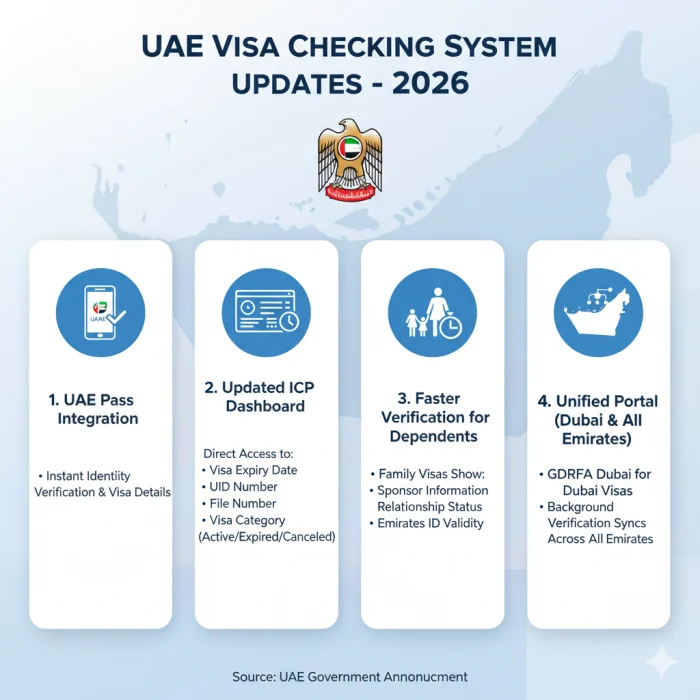
Integration with UAE Pass
You can now quickly prove who you are and see all your visa information right in the UAE Pass app.
New ICP Dashboard
Residents and visitors can now quickly find important visa information, such as:
- Date of visa expiration
- Number UID
- Number of files
- Type of visa
- Status of your visa right now (active, expired, or canceled)
Faster verification for dependents
Family and dependent visas now show even more helpful information, like:
- Information about the sponsor
- Status of the relationship
- Validity of Emirates ID
A single portal for Dubai and the other Emirates
GDRFA Dubai still handles visas issued in Dubai, but the verification system is now in sync across all emirates to make sure the results are more accurate and go more smoothly.
Why Should I Do a UAE Visa Validity Check?
Checking the validity of your UAE visa can be a useful habit. A visa validity check keeps you updated on:
- The status of your visa
- The expiration date
- Any compliance issues
This helps you avoid any delays when it comes to making travel plans, or during the renewal period. It also helps you avoid overstaying on your visa and paying penalties. This is especially relevant for business owners who rely on timely license renewals to ensure uninterrupted access to essential operations, including professional audit and accounting services.
How to Check UAE Visa Status?
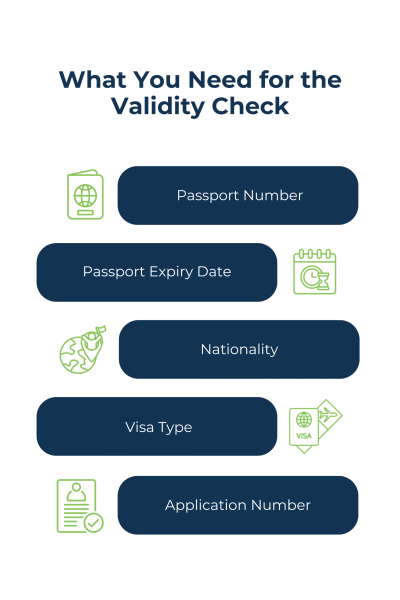
If you’re tracking your visa application status, you will need:
- Application number
- Reference number
You’ll get both these numbers in the copy of your application form that will be emailed to you once you submit your visa application.
For any Emirate other than Dubai (Abu Dhabi, Sharjah, Ajman, Fujairah, Ras Al Khaimah, Umm Al Quwain) you can do a UAE visa status check on the ICP (Federal Authority for Identity, Citizenship, Customs and Port Security) website.
For Dubai visas, you will need to visit the (General Directorate of Residency and Foreigners Affairs) website, or use the DubaiNow app.
How to Check Visa Status With Passport Number
Once your visa application is successful, you can check visa status with passport number, regardless of whether it is a residence visa or a visit visa. For all the Emirates other than Dubai, you can use the ICP Smart Services website. For Dubai, you can use the GDFRA website.
If you don’t want to do it online, you can check your visa status UAE using ICP’s toll free number (600522222) or use their feedback platform. For Dubai visa checks, you can call Amer’s toll free number (800 5111). If you’re not in the country, you can call +9714-313-9999.
Get Certified Expert Help with Your Books
Steps for Visa Validity Check with Passport
This is how you can check the validity of your visa with your passport number. Dubai visa holders will have a different process to other Emirates.
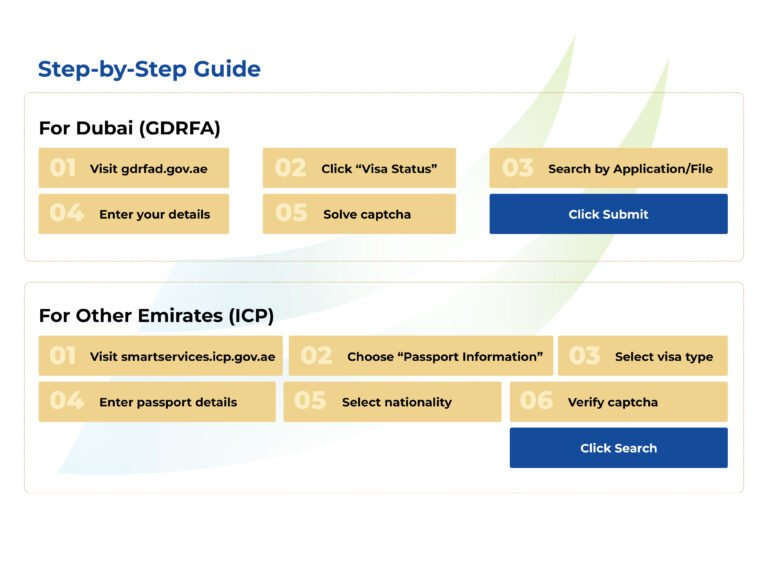
UAE Visa Validity Check
- 1. Go to the ICP Smart Services website
- 2. Search by “Passport Information”
- 3. Select the type of visa
- 4. Enter your passport details (number and expiry date)
- 5. Select your nationality
- 6. Verify captcha
Dubai Visa Validity Check
- 1. Go to the GDRFA website
- 2. Click on “Visa Status”
- 3. Search by “Application” or “File”
- 4. Verify captcha
Common Issues While Checking UAE Visa Status (2026)
Here are some of the most common problems people have when they check their visa status and how to fix them:
1. Error: “No Record Found
- The number on the passport was typed wrong.
- The passport had a new country code on it.
- The system hasn’t been updated yet because the visa was just approved.
Possible Solution :
Try again in 24 to 48 hours, or use your UID number instead.
2. The expiration date on your visa does not match the expiration date on your Emirates ID.
Your Emirates ID’s expiration date no longer matches the expiration date on your visa since 2024. These two are now handled separately.
Possible Solution :
Don’t check your visa expiration date on the Emirates ID. Always check it directly on ICP or GDRFA.
3. Dependents Not Showing Up in the System
The sponsor’s visa renewal is still not done.
The dependent’s Emirates ID is still being processed.
Possible Solution :
Use UAE Pass to log in, then click on the “Family Members” tab to see the most recent information.
Why Your UAE Visa May Show ‘Cancelled’
In 2026, these are the most common reasons:
- Employment change
- Visa transferred to new passport
- Employer canceled visa after resignation
- Free zone system update
- Overstay after grace period
If you are unsure, contact ICP 6005 22222 or GDRFA 800 5111.